Cube Solver
- 4.8
- Rating
- 50.00M
- Installs
- Free
- Price
 Analysis by App-foxy
I like puzzle apps that do something useful immediately, and Cube Solver has a clear purpose: it helps me work through twisty puzzles instead of leaving me to guess the next move. Developed by LOLAGRE, this free puzzle game is aimed at people who want help with a Rubik’s Cube, but it also covers Skewb, Pyraminx and Ivy Cube, with a training timer for practice. That combination makes it more practical than a simple digital cube.
My first impression is that this is best understood as a pocket assistant for physical puzzles, not as a replacement for learning. I can use it when I am stuck, check whether my cube was entered correctly, and return to the puzzle with a sequence to follow. It also gives beginners a less intimidating way to start learning. The important catch is that the result depends heavily on accurate setup: a solver can only work with the cube state it receives.
What makes Cube Solver useful in everyday practice
The game sits in the puzzle category, but its value is different from a conventional matching or logic game. I am not solving an abstract board generated by the app; I am using the app to understand a real object in my hands. That makes it especially handy after a failed attempt, when the cube looks scrambled and I cannot tell which move caused the problem.
You May Also Like

 Blood Strike: 2.5 Anniversary
Blood Strike’s Loadouts Turn Every Drop Into a Tactical Gamble
A close look at Blood Strike’s custom loadouts: how fast access to signature weapons reshapes its battle royale rhythm, rewards preparation, and narrows the gap between fights.

 Pandora - Music & Podcasts
Pandora’s Music Is Easy to Start, but Harder to Recover
Pandora’s strength is its low-effort path from a seed to a station. Its weak spot is how much confidence it asks you to place in connection, setup, and quiet recovery.

 8 Ball Pool
 Is Built on Rivalries, Rematches, and Routine
A close look at the rivalries, rematches, shared routines, and unanswered safety questions that turn a quick pool match into a persistent mobile community.

 Samsung Music
’s Quiet Strength Is Playing What You Already Own
Its reach comes less from spectacle than from dependable access to a personal library. That simplicity is both the app’s strongest retention engine and its ceiling.

 AccuWeather: Weather Radar
AccuWeather Review: A Quick, Clear Forecast for Everyday Decisions
For everyday plans, the best forecast is the one you can understand quickly. AccuWeather makes rain timing, radar, and local conditions easy to act on, with a few trade-offs.

 Hill Climb Racing
Why Hill Climb Racing Still Turns Crashes Into One More Run
A tiny car, a bumpy hill and one more upgrade: Hill Climb Racing keeps resurfacing because its simple chaos makes every near-miss feel personal.
More From Our News Desk
View All News


A realistic use case is a short practice session at home. I might scramble a Rubik’s Cube, try to solve it from memory, and then enter the position when I reach a dead end. Instead of resetting immediately, I can inspect the suggested sequence and follow it carefully. That turns a frustrating mistake into a chance to see where my method went wrong.
The same approach suits someone who has just bought a first cube. Beginners often know a few moves but lose track of the cube’s orientation. A solver can provide a safety net while they learn notation and recognize patterns. I would still advise treating each solution as a lesson: pause after a few moves, identify what changed, and avoid blindly tapping through a long sequence.
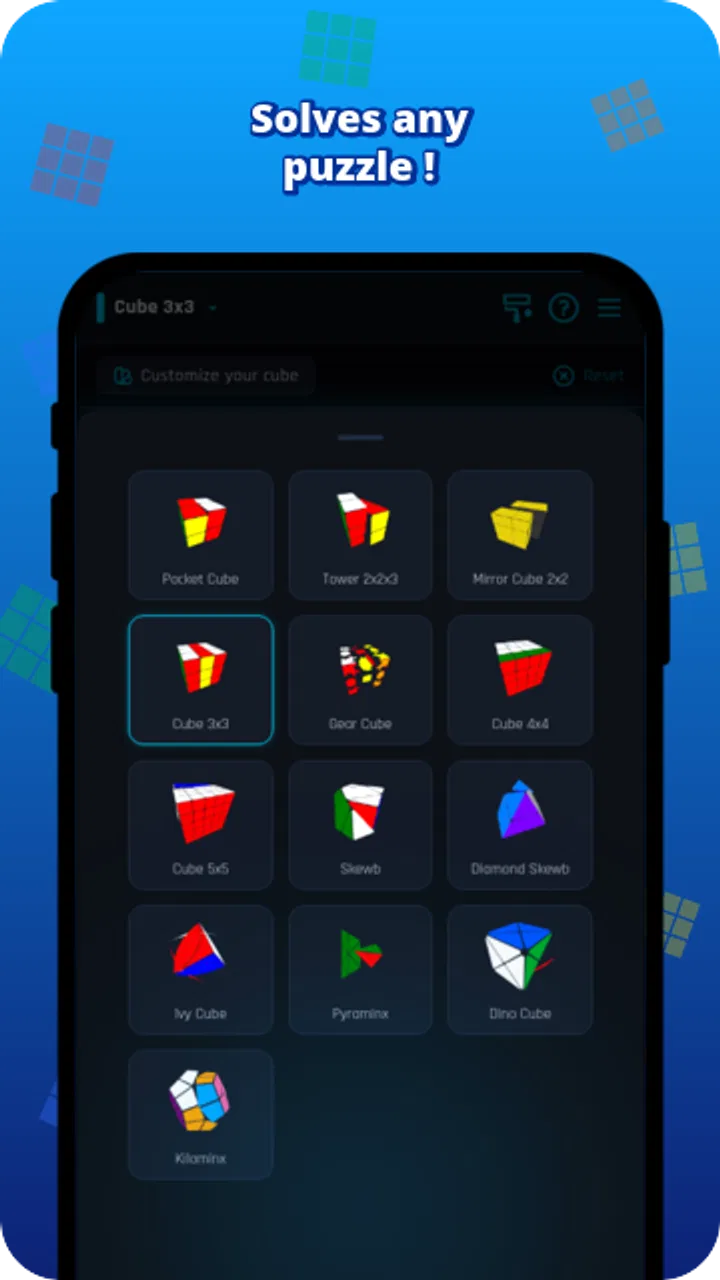
Support for several puzzle shapes is another meaningful strength. A person who owns more than a standard Rubik’s Cube does not need a separate app for every puzzle. Skewb, Pyraminx and Ivy Cube each feel different in the hand, so having them together is convenient for a mixed collection. The training timer adds a practice angle for users who want to monitor their solving sessions rather than only recover from mistakes.
Its popularity is easy to understand. Cube Solver has an average rating of 4.8 from around 1.6 million ratings, and it has passed 50 million installs. Those figures do not guarantee that every person will enjoy the interface, but they do suggest that the basic idea works for a very broad audience.
Where people usually get stuck
The most common trouble is not necessarily a failure in the solving logic. It is usually a mismatch between the physical cube and the colors entered on screen. If one face is viewed from a different direction halfway through setup, the app may be solving a different cube state from the one sitting on the table.
I find it helpful to choose one fixed orientation before entering anything. For example, I keep the same top and front faces facing me while recording the colors, and I avoid rotating the physical cube until the whole entry is complete. The exact color arrangement matters more than speed. A rushed setup can create a problem that looks like an incorrect solution later.
Lighting can also make color recognition harder, especially with glossy stickers or pale shades. I would check the cube near a neutral light source and compare neighboring pieces rather than relying on a quick glance. If a displayed color seems uncertain, it is worth stopping and correcting it before asking for a solution.
Another point that catches new users is following the sequence in the wrong direction. Cube notation often assumes a particular viewpoint. If I turn the cube in my hands whenever the sequence becomes inconvenient, a move that was correct from the original orientation may become wrong. I keep the cube positioned consistently and make each turn deliberately.
The solver is only as reliable as the cube state entered into it. That is not a weakness unique to this app; it is a basic limitation of any digital tool that works from manual puzzle input. Understanding this early prevents a lot of unnecessary frustration.
Setup checks that save time
Before blaming the app, I use a small setup routine. First, I make sure I have selected the correct puzzle type. A sequence for a Rubik’s Cube is not useful if I accidentally started with a different twisty puzzle. Since the app supports several designs, choosing the right one is an important first check rather than a minor detail.
Next, I inspect the cube for an unusual physical problem. A loose piece, a rotated center, or a cube that has been taken apart and reassembled incorrectly can produce a position that normal solving logic cannot accept. If the puzzle has been disassembled recently, I would verify that it was put back together properly before spending time re-entering the colors.
I also recommend entering the state in one uninterrupted pass. Switching between the app and the cube repeatedly makes it easier to lose orientation. If I need to pause, I leave the cube on the table in the same position and note which face I was checking. This simple habit is more useful than trying to type quickly.
For a first attempt, I would use a lightly scrambled cube rather than the most chaotic scramble possible. That makes it easier to compare the suggested moves with visible changes. Once the process feels familiar, more difficult positions become less intimidating. The app is most helpful when I can tell whether my own handling is accurate.
There is also a practical device question. Cube Solver runs on Android devices using version 7.0 or later, so an older phone or tablet may be the first thing to check if installation is unavailable. The current version is 5.0.0. I would update the app when an update is offered and restart it if the screen behaves oddly, but I would not assume every solving problem is an app-version issue.
Recovering when a solution seems to fail
When a sequence stops making sense, I do not immediately restart from the beginning. I first return the cube to the last position I know was correct. Then I check whether I made a half-turn when the instructions required a quarter-turn, or whether I turned the wrong face because the cube shifted in my hands.
Counting moves out loud can help. It sounds basic, but it keeps my attention on the sequence and makes it easier to locate the first mistake. I also prefer completing a short group of moves before checking the whole cube. If the cube looks wrong after one step, the error is easier to identify than it would be after several dozen turns.
If I lose track completely, I start the entry process again rather than trying to repair an uncertain state. Re-entering takes time, but it is usually faster than following instructions based on a cube that may no longer match the app’s record. Taking a quick photograph of the cube before beginning can also help me restore the original orientation if I accidentally rotate it.
The training timer is useful in a different way. I would not use it as a measure of ability after a single solve, because setup delays and mistakes can distort the result. Instead, I use it across several ordinary attempts and look for consistency. A slower but clean solve tells me more than a fast attempt interrupted by repeated resets.
This is one of the app’s less obvious benefits: it separates solving help from practice feedback. I can use the solver when learning or recovering, then use the timer when I want to practice independently. That makes the app more flexible than a tool that only displays an answer.
When the app is not the cause
Some apparent failures come from the physical puzzle. A cube with a damaged mechanism may catch during a turn, making it easy to perform a move incompletely. If a face does not turn through its full rotation, the physical state no longer matches the sequence. I would check that every move is finished before beginning the next one.
Reassembled puzzles deserve special attention. A standard cube can look normal while still having an impossible arrangement if pieces were replaced incorrectly. In that situation, a solver may reject the state or produce instructions that cannot be completed. The right fix is to correct the cube’s construction, not to keep trying alternative sequences.
My phone can also create friction. A small screen, dim display or distracting environment makes it harder to read moves and maintain the correct orientation. I prefer a stable surface and enough light to see both the cube and the instructions. This is not glamorous advice, but it reduces the mistakes that users often attribute to the software.
There is a broader limitation too. A solver can show me what to do, but it cannot automatically give me good finger technique, efficient turning, or a deep understanding of cube theory. Someone focused on speedcubing may eventually prefer dedicated training material, algorithm references or a timer built specifically around competitive practice. Cube Solver is more approachable as a general helper than as a complete coaching system.
Likewise, people who want a purely relaxing digital puzzle may find the app too dependent on a physical cube. Its strongest experience comes from having a real Skewb, Pyraminx, Ivy Cube or Rubik’s Cube nearby. If I only want to play on the screen without handling a puzzle, a traditional virtual cube game may be a better fit.
Who should use it, and who should skip it
I would recommend Cube Solver to beginners who want reassurance while learning, families sharing several twisty puzzles, and casual solvers who occasionally get stuck. It is also a sensible choice for anyone who wants one app covering multiple puzzle formats instead of collecting separate tools.
It is particularly useful for learning through correction. Rather than scrambling the cube again every time I make a mistake, I can use the suggested solution to recover it and then repeat the section that caused trouble. That workflow makes practice less wasteful and keeps a failed attempt from feeling final.
I would be more cautious about recommending it to advanced speedcubers who need detailed performance analysis, specialized training plans or highly focused competition features. The timer is helpful, but a general solver should not be mistaken for a full speedcubing platform. A dedicated alternative may offer better insight for users whose main goal is shaving time from every solve.
People who dislike manual color entry may also lose patience. The app’s usefulness depends on careful interaction with the physical puzzle, and there is no shortcut around that basic responsibility. If I want automatic recognition from a camera or a completely hands-off process, I would look for a tool designed specifically around that workflow instead.
Cost, access and the everyday trade-off
The game is free, carries an Everyone content rating, and includes in-app purchases priced at $5.99 per item. That makes it easy to try before deciding whether the extra purchase is worthwhile. I appreciate that the basic idea is accessible, although I would still check which parts of the experience are covered before paying for anything.
Because it is a puzzle game rather than a social platform or a competitive service, the main value is personal practice. I can open it for a quick rescue, use it during a learning session, or keep the timer available for repeated attempts. The free entry point suits occasional users, while the broader puzzle support gives regular hobbyists a reason to keep it installed.
The developer, LOLAGRE, has kept the concept focused: identify a supported puzzle, work with its current state, and help the user move forward. That focus is a strength when I need an answer quickly. It is less appealing if I am looking for extensive lessons, community interaction or a highly customizable training environment.
My practical verdict
After using Cube Solver as a companion to physical twisty puzzles, I see it as a dependable starting point rather than a complete replacement for learning. Its strongest feature is the way it turns a confusing scramble into a manageable sequence, while support for multiple puzzle types and a training timer gives it value beyond one emergency solve.
The key to a good experience is discipline during setup. Keep the cube facing the same way, enter colors carefully, confirm the selected puzzle, and follow moves without casually rotating the object. When something goes wrong, check the first move that diverged and consider the condition of the physical cube before assuming the app is broken.
For beginners and casual puzzle owners, I would install it. It is free to try, broadly used, and practical in the exact moments when a cube becomes frustrating. I would skip it only if I wanted a fully digital game, automatic recognition, or advanced speedcubing analysis. For everyone else, it is a useful pocket guide that helps turn stuck moments into productive practice.
FAQs for Cube Solver
01What is Cube Solver and how does it work?
Cube Solver is an innovative app designed to help users solve Rubik's Cubes of various sizes. It features an intuitive interface where you can input the current state of your cube, and the app provides step-by-step instructions to solve it. The algorithms used are efficient and suitable for both beginners and advanced users.
02Is Cube Solver compatible with all types of Rubik's Cubes?
Yes, Cube Solver is compatible with a wide range of cube sizes and types, including the classic 3x3, as well as 2x2, 4x4, and beyond. The app frequently updates to include new cube variations, ensuring comprehensive support for enthusiasts who like to explore different cube puzzles.
03Do I need an internet connection to use Cube Solver?
No, Cube Solver is designed to work offline once it’s downloaded. This means you can access the solver features anytime and anywhere without needing an internet connection. However, for updates or additional features, an internet connection might be necessary.
04Is Cube Solver suitable for beginners?
Absolutely! Cube Solver is user-friendly and includes tutorials and guides specifically tailored for beginners. It breaks down each step of the solving process and offers visual aids to help new users understand and learn how to solve the cube efficiently.
05Are there any in-app purchases or ads in Cube Solver?
Cube Solver offers a free version that may include ads, but it also provides a premium version available via in-app purchase. The premium version removes ads and may offer additional features, such as advanced solving techniques and customizable themes, enhancing the overall user experience.
Pros
- Intuitive interface simplifies solving.
- Supports multiple cube sizes and types.
- Offers step-by-step solving guides.
- Includes practice mode for skill improvement.
- Lightweight app with quick load times.
Cons
- Limited customization options.
- No offline functionality available.
- Ads can be intrusive at times.
- Lacks advanced solving techniques.
- Occasional bugs in new updates.

Cube Solver
Gallery